The printing parameters of the Elegoo Mars can be adjusted in the slicer software. Most entry‑level MSLA printers, including the Mars‑series, are operated through Chitubox, which provides control over exposure behavior, layer thickness and lift mechanics. Updating to the latest version and selecting the correct printer profile ensures that machine dimensions and motion parameters match the hardware.
Adding the Elegoo Mars in Chitubox
To configure the Elegoo Mars:
- – Open Settings in Chitubox
- – Click the + icon to add a new printer
- – Select Elegoo → Mars / Mars Pro
- – Confirm the default machine parameters
The default profile is suitable for general‑purpose printing. For high‑accuracy applications, adjustments can be made in the Print and Advanced sections.
Using Liqcreate resin on the Elegoo Mars
Liqcreate engineers provide validated exposure parameters for all resins. These can be imported directly into Chitubox using the prepared setting files. This ensures correct exposure time, bottom layer behavior and lift parameters for each material. For additional tuning or advanced adjustments, the sections below explain how each Chitubox setting influences print performance. For resin‑specific parameters, visit the Elegoo Mars resin settings database.
Chitubox settings explained for the Elegoo Mars
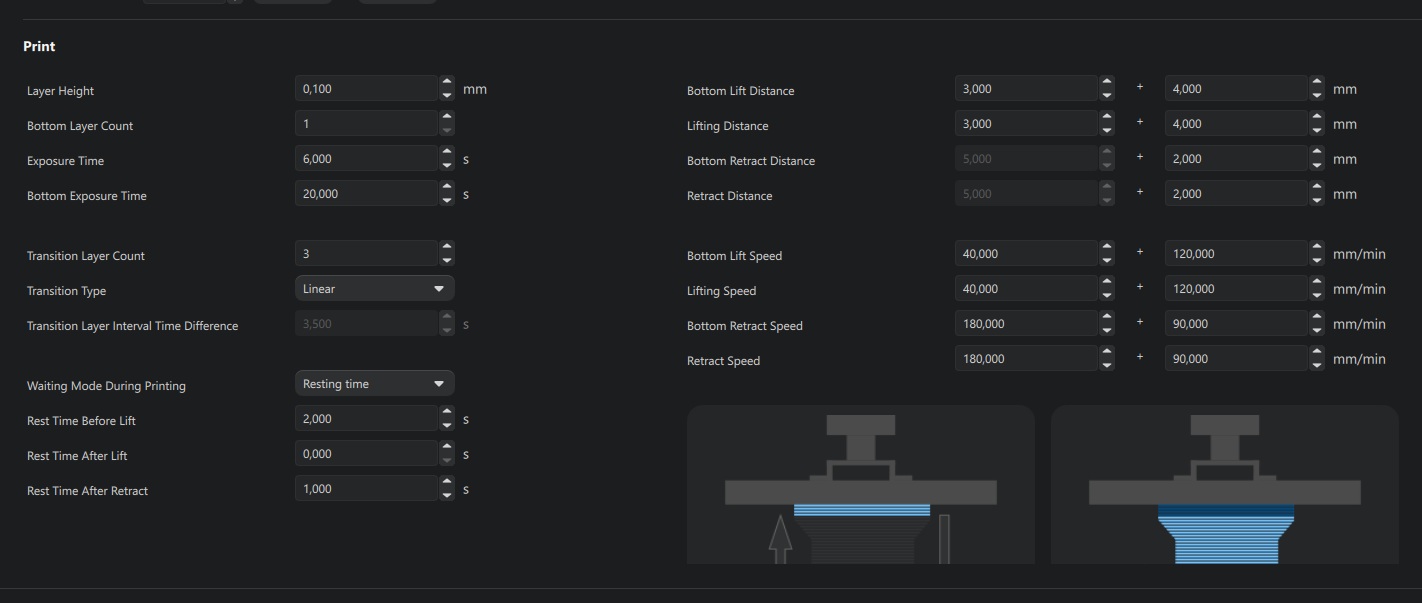
Most relevant parameters are located in the Print section. Additional options such as anti‑aliasing, blur and tolerance compensation are found in Advanced. These advanced features are often still experimental and are typically disabled for consistent results.
Layer height
Defines the thickness of each layer.
- – 0.10 mm for general applications
- – 0.05 mm for detailed parts and dental work
- – 0.025 mm for high‑precision jewelry
Bottom layer count
Number of base layers exposed longer for adhesion. Typical range: 1–5 layers.
Bottom exposure time
Exposure duration for the bottom layers. Usually 5–20× the regular exposure time. A well‑calibrated build plate allows lower values.
Transition layer count
Gradually reduces exposure from bottom layers to regular layers. Common setup: 2 bottom layers + 6 transition layers.
Transition type
Linear works reliably for most materials.
Transition time decrement
Automatically calculated by Chitubox.
Waiting mode during printing
Always set to resting time. For flexible, dental or demanding materials: 2.0 seconds per step. Set 2.0 seconds wait time before lift provides higher quality printed parts.
Bottom lift distance
- – Rigid resins: 6.0 mm
- – Flexible resins: 10.0 mm
Lifting distance
Same values as bottom lift distance.
Bottom retract distance & retract distance
Automatically matched to lift distance.
Bottom lift speed
- – Standard materials: 50 mm/min
- – Reduce if adhesion issues occur.
Lifting speed
- – Standard: 90 mm/min
- – Rigid parts: can be increased
- – Flexible resins: max 60 mm/min
Bottom retract speed
- – Standard: 100 mm/min
- – Reduce if adhesion issues occur.
Retract speed
- – Standard: 150 mm/min
- – Flexible resins: max 60 mm/min
Help with Chitubox settings for the Elegoo Mars
If you need assistance tuning Chitubox settings, exposure parameters or Liqcreate resin workflows, contact our engineering team at info@liqcreate.com.
Support
Do you need any help with 3D printing our SLA, DLP or LCD resins? We can help you! Just look for the question you have below. If you can’t find it, let us know by contacting us!


