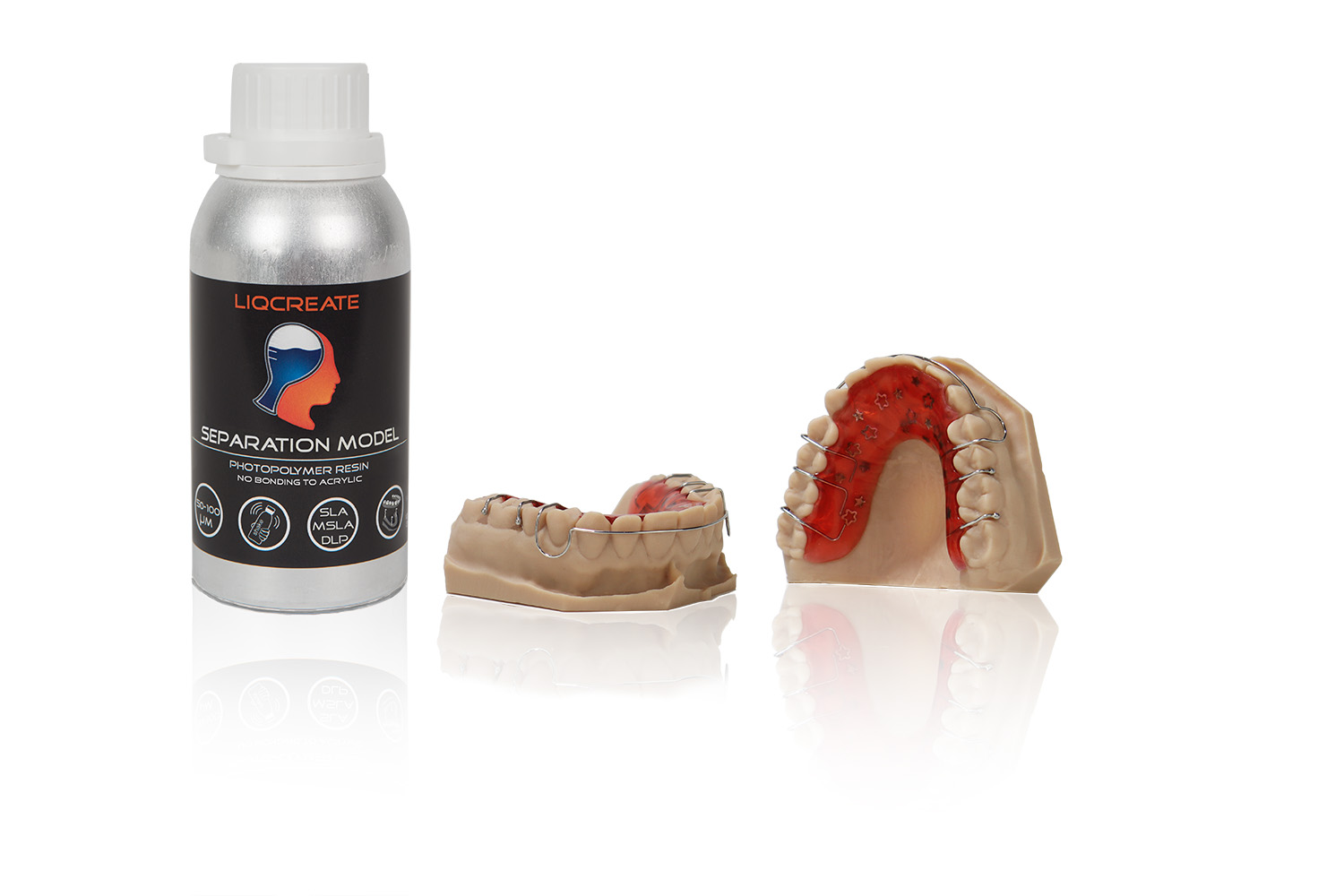
Liqcreate Separation Model is a specialized photopolymer resin for 3D‑printing dental models with excellent non‑stick properties toward dental acrylics. It is compatible with most open DLP, MSLA, and laser‑based 3D‑printers operating at wavelengths between 385–405 nm. Printed parts exhibit high accuracy, smooth surfaces, and optimal separation behavior, making them ideal for workflows where acrylic (PMMA) orthodontic retainers are polymerized directly on the model and removed cleanly afterward without the use of a separation agent. If you have any questions, reach out to us at info@liqcreate.com and our technical team will assist.
For high‑precision dental models, the recommended materials are Liqcreate Dental Model Pro Beige or Grey. For the production of aligner models, Liqcreate Premium Model is advised. Liqcreate Separation Model is not suitable for these applications and should be used only when non‑stick properties are required for processing dental or orthodontic acrylics for retainers.
The following topics are covered in this article:
- Caution: strong adhesion to build plates!
- Caution: fill resin tank to 75%!
- Shake before use.
- 3D-printing parameters.
- Shrinkage and offset parameters (for creating high accuracy models)
- Support settings.
- Cleaning, washing and post-curing your part.
- How to clean/filter the resin?
- Patterns in resin during/after printing.
- Minimum wall thickness for hollowing models.
- Part orientation, over-hang & drain holes.
- Orientation for best non-stick PMMA properties
- Part surface finish or sticky surface.
- Ideal resin printing temperature.
- Solving print failures.
- Storage conditions.
- Additional information.
Support
Do you need any help with 3D printing our SLA, DLP or LCD resins? We can help you! Just look for the question you have below. If you can’t find it, let us know by contacting us!
Technical →
1) Caution: Strong adhesion to build plates.
Liqcreate Separation Model is softer than standard model resins and exhibits increased adhesion to metallic build plates. This behavior is inherent to its non‑stick chemistry and cannot be modified. To reduce the risk of model damage during removal, the following practices are recommended:
- 1) Print models in a vertical orientation using a 50‑micron layer thickness
- 2) Minimize the number of bottom layers and use the lowest feasible bottom exposure time
- 3) Apply a bottom‑layer offset of –0.200 mm in XY directions, or A and B direction (typically available in the advanced settings)
- 4) Use a sharp, flat metal spatula and maintain a shallow angle when lifting models from the build plate
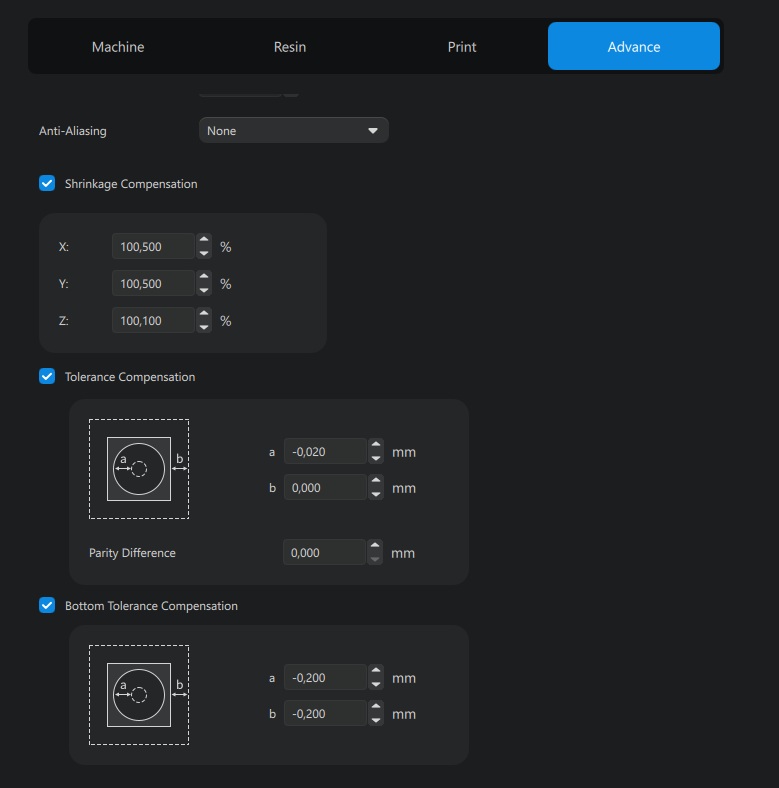
Image: Set the Bottom Tolerance Compensation to -0.200 mm in all directions (XY, or A and B) in the advanced tab of Chitubox to have the parts taken off the platform easier without breaking.
Use a sharp metal spatula and keep it as parallel to the build plate as possible when removing the printed models. Even with all parameters correctly set, a small section of the model’s bottom surface may occasionally chip during removal. Because of the non‑stick PMMA chemistry, the material remains relatively soft until it has been fully UV post‑cured. Therefore, design your models with at least 5 mm of additional thickness at the bottom. This ensures that even if a few millimeters chip off during removal, the parts remain fully usable.
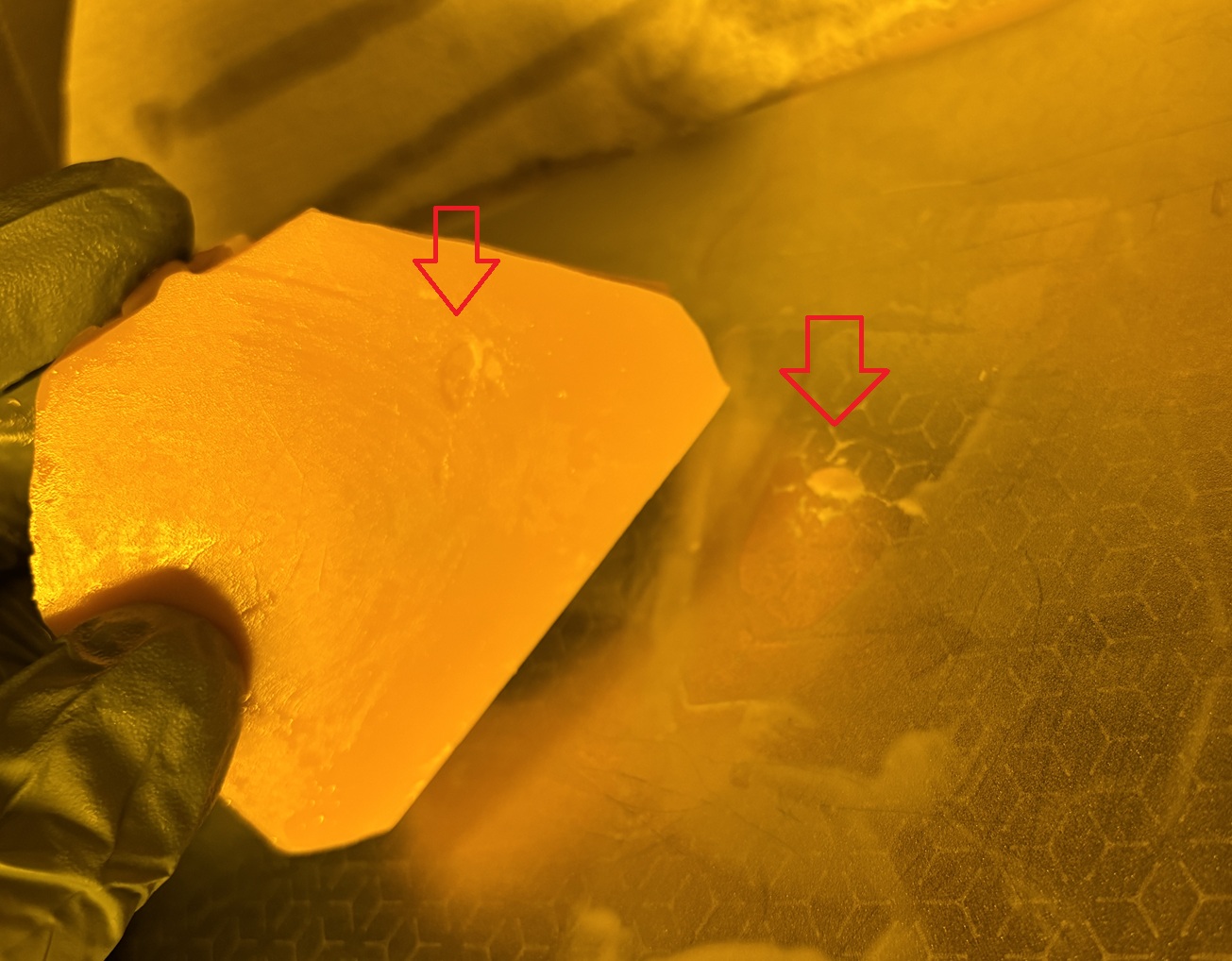
2) Caution: Fill resin tank to at least 75 percent.
Liqcreate Separation Model is initially very low‑viscosity when poured. Because of its non‑stick chemistry, the resin gradually thickens during printing as a result of heat from the printer and the movement of the build platform. This viscosity change is fully reversible. Before each print, gently mix the resin with a plastic spatula for about one minute to restore optimal flow. Using only a small volume of resin in the tank can limit resin movement as it thickens during printing, which can cause prints to fail partway through the process. Filling the resin tank to at least 75% ensures sufficient resin mass and flow, allowing the print to complete successfully.
3) Shake before use.
For most resins, including Liqcreate Separation Model, shaking for several minutes is recommended—particularly after extended storage—to ensure a homogeneous mixture before printing. After shaking, allow the resin to rest for a few minutes. Although shaking restores uniformity, it also introduces air bubbles, which may appear in the initial layers if printing begins immediately. Before starting a new print, briefly wipe the bottom of the resin tank with a soft spatula and gently mix the resin for about one minute to restore its original viscosity and ensure optimal print quality.
4) 3D-printing parameters.
Liqcreate Separation Model resin is compatible with open 3D‑printers operating at 405 nm and 385 nm, including DLP, MSLA, LCD, and laser‑based systems. The printer must support third‑party materials and allow adjustment of printing parameters. Many validated parameter sets are already available on our website. Select your printer model to check whether Liqcreate Separation Model settings are listed. If your printer is not included, feel free to contact our technical team at info@liqcreate.com for assistance.
5) Shrinkage and offset parameters.
To achieve the required accuracy for dental models, applying shrinkage compensation and dimensional offset is recommended. All 3D‑printing resins undergo some degree of shrinkage during printing and post‑processing. Without compensation, the final model may be approximately 0.5% smaller than the original STL file. For dental applications, using both shrinkage and offset adjustments is therefore essential. The optimal values vary by printer. Below you will find a list of systems that have already been tested. If your printer is not included, feel free to contact us and we will assist you. Our database of shrinkage‑optimization settings per printer is available online. The example shown demonstrates how shrinkage and tolerance compensation parameters are configured in Chitubox for Liqcreate Separation Model on the Creality Halot-Mage S 14K. Applying these settings enables the production of highly accurate dental models.
6) Support settings.
Support settings depend on several factors, including the resin type, printer technology, release mechanism, resin‑tank film material, and secondary parameters such as print speed. With the rapid expansion of resin 3D‑printers in recent years, it is not feasible to provide fully validated support settings for every system.
This section provides guidance for a selection of commonly used printers, model designs, and print speeds. Our tests were performed using a standardized dental model geometries with various support configurations. If your printed part has a larger cross‑section or is more bulky, you may need to increase the support‑tip thickness or intersection depth to ensure stability.
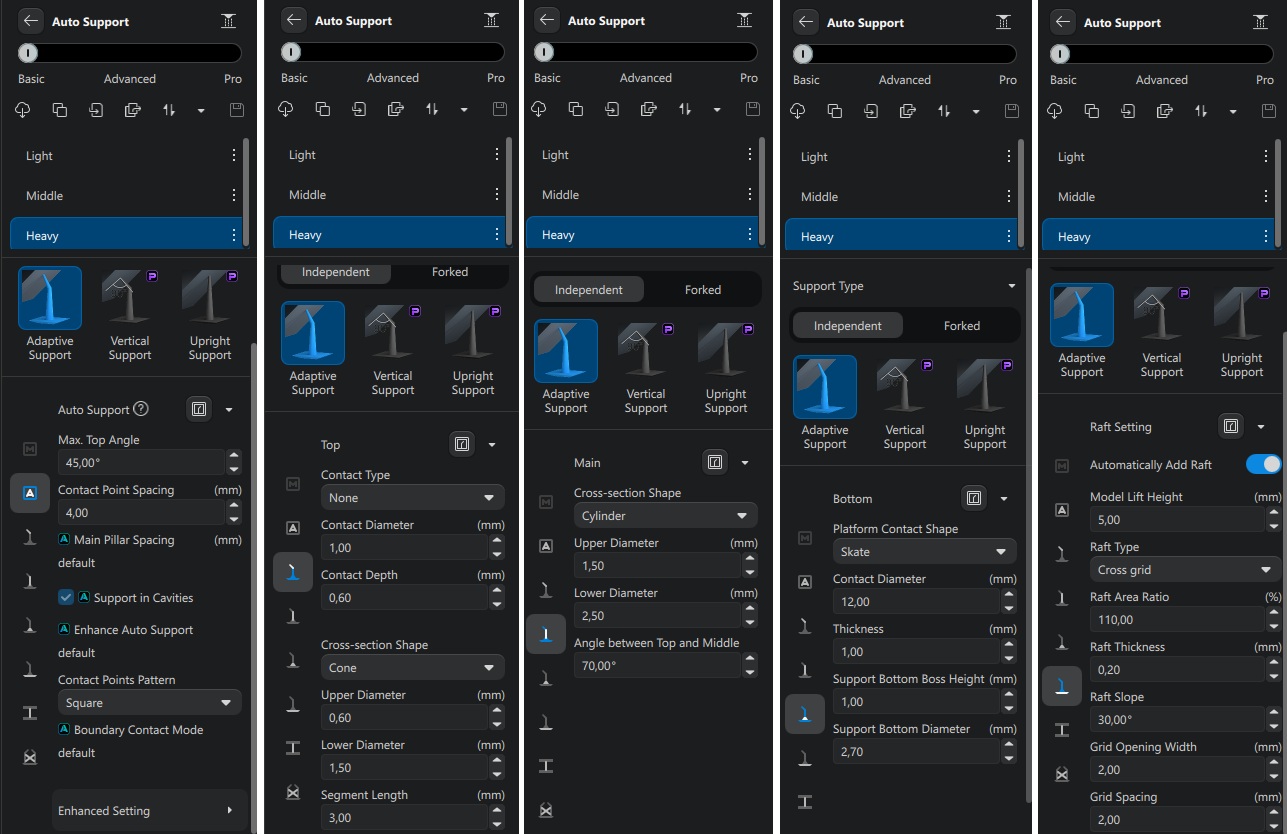
Image: Support settings for Liqcreate Separation Model, 3D-printing resin with non-stick PMMA properties.
7) Cleaning, washing and post-curing your part.
Washing procedures for Liqcreate Separation Model are similar to those used for other Liqcreate resins. Parts can be cleaned in IPA, ethanol, or Liqcreate Resin Cleaner. When using Resin Cleaner, follow the cleaning instructions provided on its product page. IPA and ethanol may be used in an ultrasonic cleaner or in an agitation‑based washing unit, such as the newer low‑cost systems from Anycubic or Elegoo. A preferred approach is two washing cycles of approximately two minutes each, with the second cycle performed in fresh IPA or ethanol for optimal results.
If small cavities remain contaminated after washing, use a soft brush to remove residual resin, then rinse the part again in fresh solvent for one minute. Allow the part to dry for about 30 minutes. Before post‑curing, ensure the surface is completely dry and free of solvent—no glossy or wet spots should remain. If solvent is still visible, perform an additional one‑minute rinse in fresh IPA or ethanol.
Avoid excessive washing times. Uncured parts exposed to IPA or ethanol for more than 30 minutes may deform. Thin components (<2 mm) are particularly sensitive, especially if the solvent in an ultrasonic cleaner becomes warm (>30°C / 86°F). If warping occurs, consider increasing wall thickness or allowing the solvent to cool below 30°C / 86°F before washing.
For small holes or tight corners that are difficult to clean, brushing with a soft brush is recommended, followed by a final rinse in fresh IPA or ethanol to remove any remaining resin.
For post‑curing, a heated curing unit is preferred but not mandatory. The best results are achieved with a 30‑minute UV cure at 60°C / 140°F in a 385–405 nm curing chamber. Entry‑level curing units can also deliver good results with a 30‑minute cycle at room temperature. Additional post‑curing guidance and settings for various curing units are available through the extended documentation.
8) How to clean / filter the resin?
When a print fails, it is recommended to clean the resin tank before starting a new job. One of the simplest methods is to place a small object—such as a cylinder—into a corner of the resin tank and activate the resin‑cleaning function for about 30 seconds. You can then lift out the object along with the cured film of resin and any trapped debris. As an alternative, you may filter the resin to ensure that all hardened particles are removed. Starting a new print with cured fragments still in the tank can damage the FEP film or even the LCD screen. A standard resin filter is sufficient for removing debris from Liqcreate Separation Model resin.
9) Patterns in resin during / after printing.
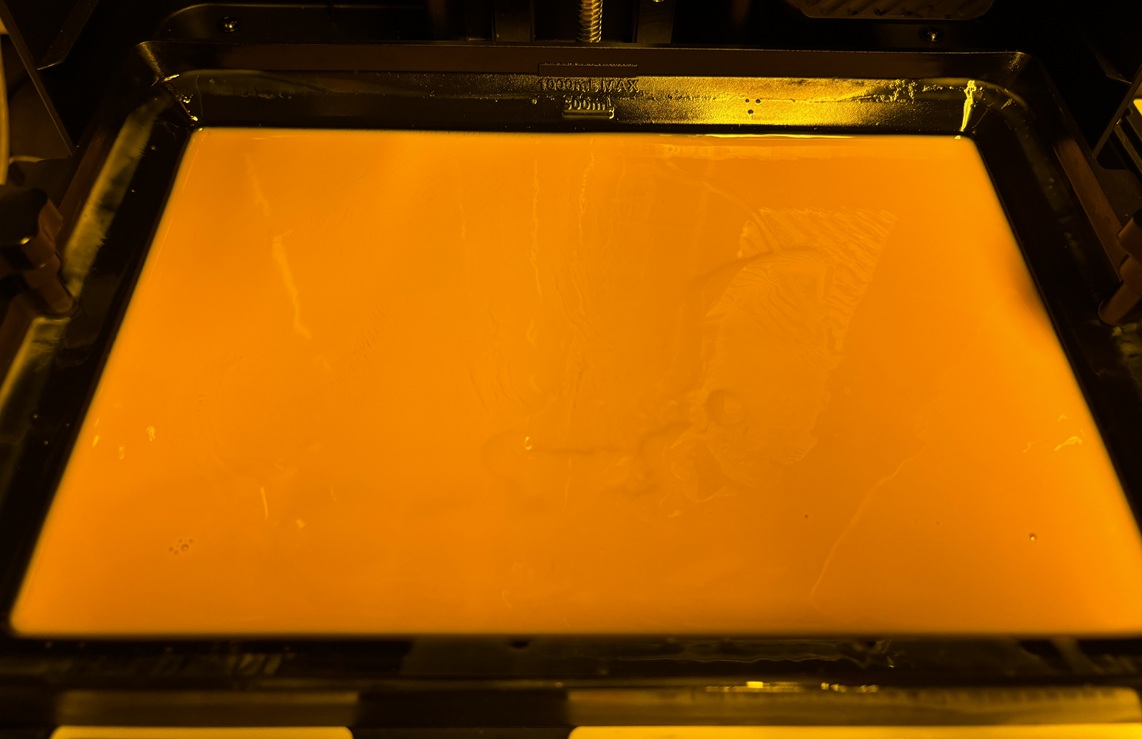
When the resin is fresh or has just been mixed, it has a low viscosity. Because of the non‑stick PMMA chemistry, the resin gradually thickens during printing. Heat from the printer and the movement of the build platform both contribute to this temporary increase in viscosity. As explained in Chapter 2, the resin tank should be filled to at least 75% to ensure that the resin can flow back beneath the model after each layer. You may also notice a wavy surface in the resin tank or on top of the build plate during printing. This is completely normal. Before starting each new print, gently mix the resin with a plastic spatula for about one minute to restore its original viscosity and ensure consistent performance.
10) Minimum wall thickness for hollowing models.
When printing dental models with Liqcreate Separation Model, it is recommended to produce them with a minimum wall thickness of 5 mm, and preferably as fully solid parts. Unlike standard model resins, hollowing is not advised for this material. The non‑stick PMMA chemistry requires a more robust structure to ensure dimensional stability and to prevent deformation during printing and post‑processing.
If a model must be hollow for design reasons, ensure the wall thickness is no less than 5 mm and incorporate adequate drain holes near the base to relieve internal pressure—especially when printing directly on the build plate. Proper venting is essential to maintain print quality and prevent suction‑related defects.
11) Part orientation, over-hang & drain holes.
It is not advised to print large and relatively flat parts on supports. if possible, always print at an angle to prevent large bottom surfaces as the quality when printing in an angle is much better. In this test we printed a part from Thingiverse and also made a modification on it to see at which angle the parts can be printed. The thingiverse file was rather solid, while our own modification had a wall thickness of 2.0 mm.
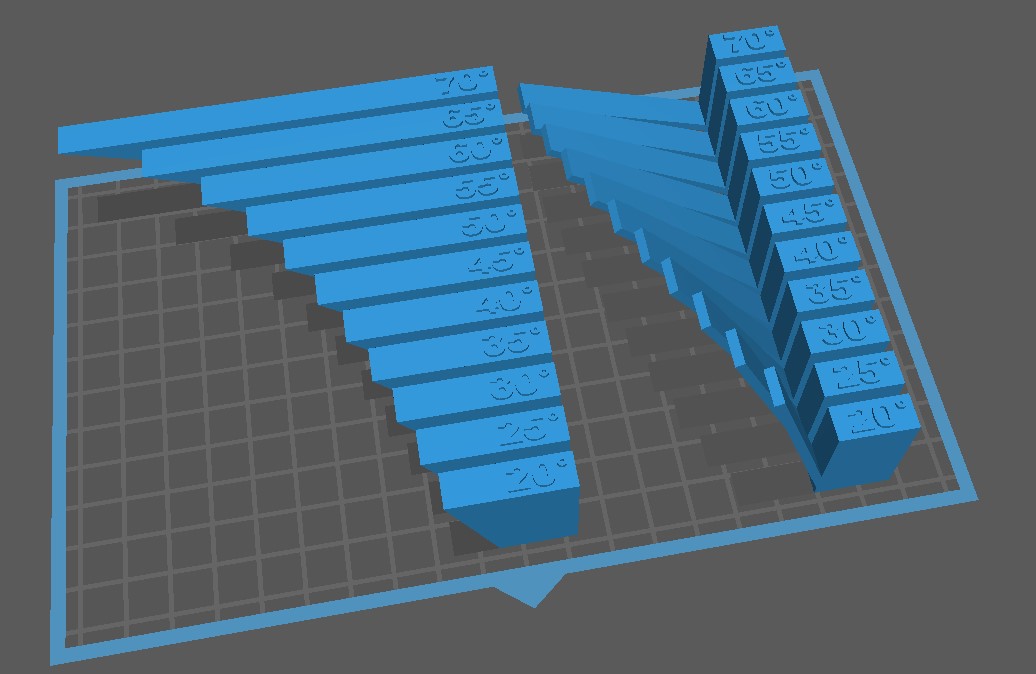
Image: Testing printing angle with the Thingiverse (Thing 40382) file and a small modification of it with thinner walls (2.0 mm).
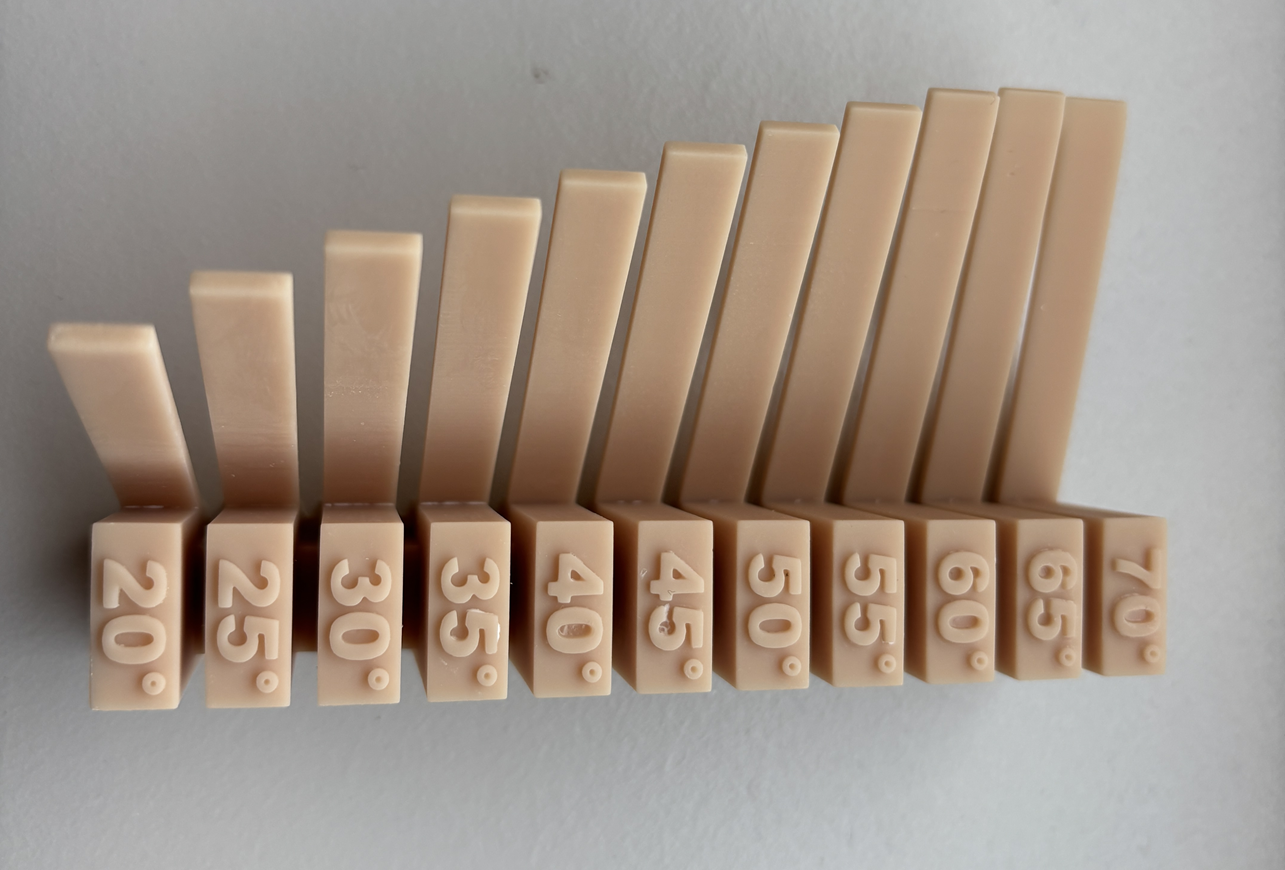 Image: test to print at different angle without supports with Liqcreate Separation Model resin.
It is possible to print 2mm thick walls in Separation Model resin at an angle of 70 degree. However, the bottom surface will be better when supporting parts with an angle above 50 degree.
12) Orientation for best non-stick PMMA properties
To obtain optimal non‑stick performance with PMMA, it’s recommended to orient the parts hanging from the build platform and print at a 50‑micron layer height. This minimizes surface roughness from layer lines. Any additional texture—whether from thicker layers or sub‑optimal print settings—can increase adhesion to dental and orthodontic acrylics (PMMA).
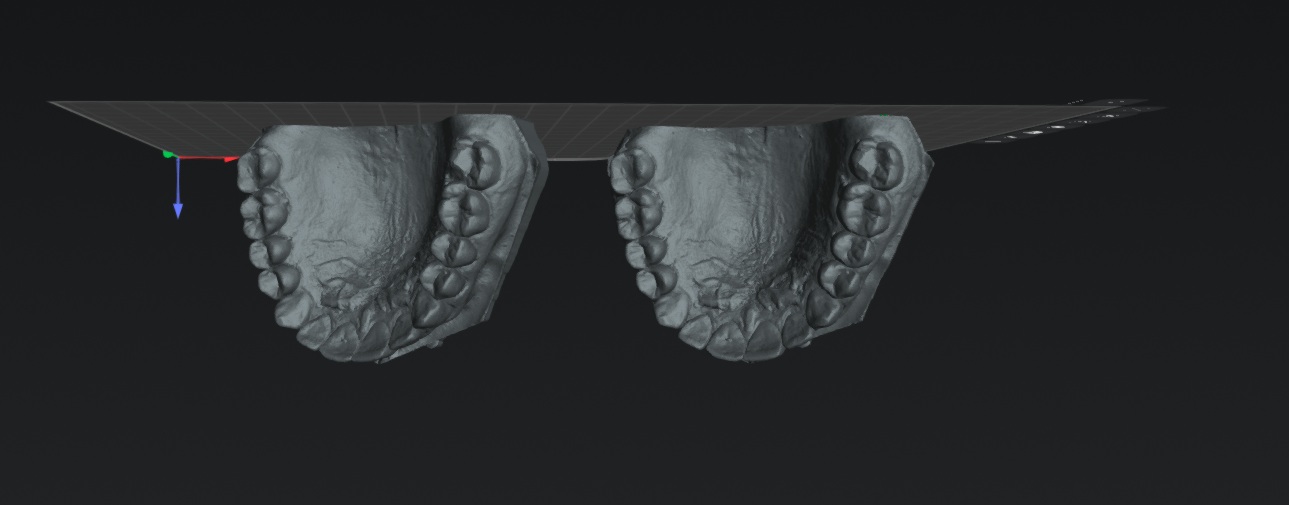
Image: advised orientation for dental models to achieve best non-stick properties towards PMMA.
13) Part surface finish or sticky surface.
Printed parts from Liqcreate Separation Model are opaque and shiny during printing. A matte surface will appear after washing and drying as in the product pictures below.
14) Ideal resin printing temperature.
It is advised to print with Liqcreate Separation Model resin at at 20°C / 68°F and maximum at 25°C / 77°F. printing at lower temperature causes random failure in the material. Excessive heating can lead to faster de-mixing of the resin and is not advised.
15) Solving print failures with Liqcreate Separation Model resin.
There are a lot of common resin 3D-printing issues. In this article you can find 10 common resin 3D-printing fails and how to solve them. If you have need support, send is an e-mail at info@liqcreate.com and our technical team will try to assist.
16) Storage conditions.
Store the product in its original bottle, plug and cap at minimal 5°C / 41°F and maximum 30°C / 86°F. Avoid sources of heat, radiation, static electricity, sunlight and contact with food.
17) Additional information.
- – Product information
- – List of compatible 3D-printers
- – Printer settings
- – Shrinkage optimization parameters
If you have any questions when working with Liqcreate Separation Model or any other Liqcreate resin, send us an e-mail at info@liqcreate.com.
Liqcreate Separation Model
Liqcreate Separation Model is a specialized photopolymer resin for 3D‑printing dental models with excellent non‑stick properties toward PMMA. It is compatible with most open DLP, MSLA, and laser‑based 3D‑printers operating at wavelengths between 385–405 nm. Printed parts exhibit high accuracy, smooth surfaces, and optimal separation behavior, making them ideal for workflows where PMMA orthodontic retainers are polymerized directly on the model and removed cleanly afterward without the use of a separation agent.
Liqcreate Separation Model requires only UV post‑curing to achieve its final mechanical performance and separation characteristics. Its reliable processing, dimensional stability, and engineered non‑stick surface make it the perfect choice for manufacturing dental models used in PMMA retainer production.
Key benefits |
3D-Printer compatibility |
| · Excellent non-stick properties towards PMMA | · Asiga UV series |
| · No need for separating agent | · Elegoo & Anycubic series |
| · Easy Ortho PMMA release | · Phrozen & Creality series |
| · High quality and smooth surface | · And many more |


