The Kudo3D Bean resin 3D-printer is a low power RGB LCD-based 3D-printer, completely open for 3rd party resins. Settings are optimized for all Liqcreate resins. Due to the low power light source, exposure times are generally longer for the Kudo3D Bean. Liqcreate Premium resins are especially developed for printing on low power LCD 3D-printing, leading to significantly shorter exposure times, also on the Kudo3D Bean. Looking for settings for a different printer, find the 3D printer resin settings database here.
What are the best exposure settings for Kudo3D Bean?
Exposure settings are different for each resin. In the list (last updated december 2025) below you can find exposure data for a wide range of industrial, jewelry and dental resins from Liqcreate.
| Resin | Layer thickness | Settings | Remark |
| Deep Blue | 100 µm | 17 seconds | |
| 50 µm | 15 seconds | ||
| 25 µm | 13 seconds | ||
| Stone Coal Black | 100 µm | 16 seconds | |
| 50 µm | 14 seconds | ||
| 25 µm | 12 seconds | ||
| Premium White | 100 µm | 11 seconds | |
| 50 µm | 9 seconds | ||
| 25 µm | 7 seconds | ||
| Premium Black | 100 µm | 13 seconds | |
| 50 µm | 11 seconds | ||
| 25 µm | 10 seconds | ||
| Premium Model | 100 µm | 13 seconds | |
| 50 µm | 11 seconds | ||
| 25 µm | 10 seconds | ||
| Premium Tough | 100 µm | 12 seconds | |
| 50 µm | 10 seconds | ||
| Premium Flex | 100 µm | 14 seconds | use ‘heavy’ supports |
| 50 µm | 12 seconds | use ‘heavy’ supports | |
| Clear Impact | 100 µm | 20 seconds | |
| 50 µm | 16 seconds | ||
| 25 µm | 13 seconds | ||
| Strong-X | 100 µm | 15 seconds | |
| 50 µm | 14 seconds | ||
| 25 µm | 12 seconds | ||
| Tough-X | 100 µm | 30 seconds | |
| 50 µm | 28 seconds | ||
| Flexible-X | 100 µm | 26 seconds | use ‘heavy’ supports |
| 50 µm | 24 seconds | use ‘heavy’ supports | |
| Hazard Glow | 100 µm | 20 seconds |
Table of Liqcreate resin exposure settings for Kudo3D Bean 3D printer
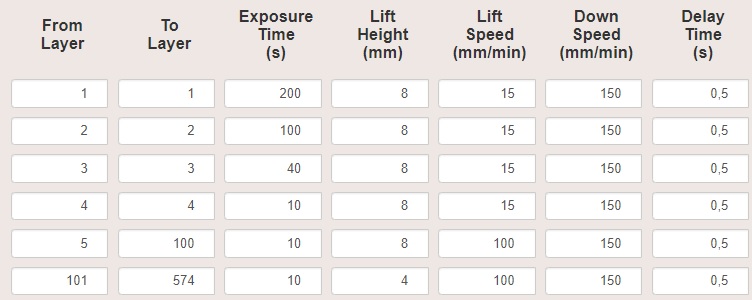
Pro tip: Use exposure templeate from below and just change the last 3 exposure times to value listed above!
If you have any questions related to Liqcreate resins on the Kudao3D Bean or any other 3D-printer, please reach out to us at info@liqcreate.com
Support
Do you need any help with 3D printing our SLA, DLP or LCD resins? We can help you! Just look for the question you have below. If you can’t find it, let us know by contacting us!
Printer Settings →
About the Kudo3D Bean resin 3D-printer
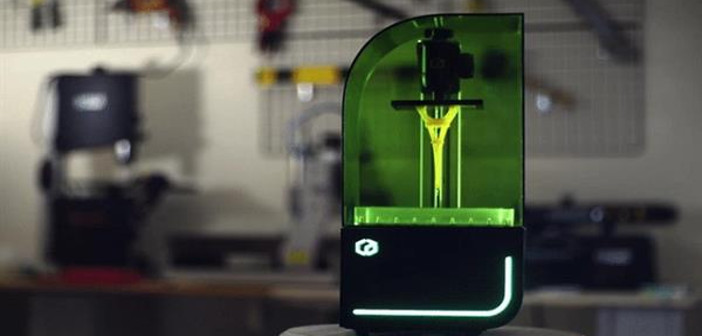
Kudo3D Bean resin 3D-printer specifications
The Kudo3D Bean is an RGB based LCD 3D-printer, pre-calibrated with a spring-loaded, self-leveling build platform. It can be controlled and monitored remotely using mobile devices, and features a high resolution LCD panel. It’s a compact printer, too, and lightweight, weighing only 15 pounds, making it an easy fit for the desktop. A few specifications include:
- – Dimensions: 8″ x 8″ x 16″
- – Weight: 15 lbs
- – Build area: 2.7″ x 4.7″ x 5.9″
- – Print speed: 1 to 2 cm per hour (at 50 microns resolution)
Contact us if you have any questions or when you need help with settings for the Kudo3D series or other resin based 3D-printers.
Frequently asked questions – FAQ
- Q: Can I use third-party resins on the Kudo3D Bean?
- A: Yes, the Kudo3D Bean is open for 3rd party resins.
- Q: What kind of 3D-printing technology does the Kudo3D Bean use?
- A: The Kudo3D Bean resin 3D-printer uses MSLA technology, also known as LCD.
- Q: How do i fill in the correct parameters for my resin?
- A: Every resin has its own parameters. In the tables on top you can find the right exposure time for each resin.


