After introduction, the Uniz Slash resin ecosystem has become a trusted choice for professionals who demand accuracy, reliability, and material flexibility in LCD‑based 3D printing. As one of the earliest precision desktop LCD printers, the Uniz Slash series earned a reputation for combining a robust mechanical platform with an open‑material philosophy—making it particularly attractive for users who want to work beyond proprietary resin systems. Because the printer is fully compatible with third‑party photopolymers, it offers an exceptional level of freedom when selecting materials for engineering, dental, prototyping, or general-purpose applications. This openness has made Uniz Slash resin workflows especially popular among users who rely on high‑performance resins from independent manufacturers such as Liqcreate.
Although the Slash platform uses a medium‑power LCD light engine, it remains highly capable when paired with the right resin formulations. The printer’s optical output is well‑matched to the reactivity of many modern 405 nm photopolymers, and its stable exposure system ensures consistent layer curing across the build area. For users working with Liqcreate materials, this means that a wide range of resins—from flexible elastomers to engineering‑grade composites—can be processed successfully on the Uniz Slash with the correct parameter tuning. In practice, the Premium‑series Liqcreate resins tend to deliver the fastest and most efficient printing performance on this machine due to their optimized reactivity for lower‑intensity light sources. These materials cure more rapidly, maintain dimensional stability, and provide a smooth surface finish that takes full advantage of the Slash’s native resolution.
From a technical standpoint, all Liqcreate resins are compatible with the Uniz Slash, even though not every formulation has a dedicated preset available in the printer’s software. This is a natural consequence of the printer’s open‑material design: users can freely adjust exposure times, lift speeds, and other parameters to match the behavior of each resin. When presets are available, they provide a convenient starting point for reliable, repeatable results. When they are not, the printer still offers full manual control, allowing experienced operators to fine‑tune settings for optimal performance. This flexibility is one of the key reasons why Uniz Slash resin workflows remain relevant in professional environments where material choice and print quality are critical.
Because resin behavior can vary depending on viscosity, pigment load, photoinitiator package, and mechanical requirements, some users may need guidance when selecting the ideal settings for a specific Liqcreate material. Exposure calibration, in particular, can significantly influence print speed, accuracy, and surface quality. For this reason, we encourage users to reach out whenever they require assistance with parameter optimization, resin selection, or troubleshooting. Our team can provide tailored recommendations, help interpret print results, and ensure that your Uniz Slash resin setup performs at its highest potential.
Whether you are producing functional prototypes, dental models, engineering components, or high‑detail visual parts, the combination of the Uniz Slash printer and Liqcreate resins offers a versatile, dependable, and cost‑effective solution. With the right settings and material choice, the Slash platform continues to deliver excellent results across a wide range of professional applications. If you have questions, need support, or want help selecting the best resin for your workflow, we are always available to assist, just send an e-mail to info@liqcreate.com.
Uniz Slash resin 3D-printing parameters.
| Resin | Layer thickness | Curing time (seconds) | Remark |
| Deep Blue | 100 µm | 18,3 | Base 21 seconds |
| 50 µm | 14,7 | Base 18 seconds | |
| Stone Coal Black | 100 µm | 16,2 | Base 22 seconds |
| 50 µm | 11,6 | Base 22 seconds | |
| Premium White | 100 µm | 8,1 | Base 18 seconds |
| 50 µm | 6,6 | Base 18 seconds | |
| Premium Black | 100 µm | 8,4 | Base 16 seconds |
| 50 µm | 6,9 | Base 16 seconds | |
| Premium Model | 100 µm | 8,5 | Base 16 seconds |
| 50 µm | 7,0 | Base 16 seconds | |
| Premium Flex | 50 µm | 8,0 | 3 base layers of 16 seconds |
| Strong-X | 100 µm | 18,5 | base 25 seconds |
| 50 µm | 20,0 | base 25 seconds | |
| Tough-X | 100 µm | 20,0 | base 40 seconds |
Support
Do you need any help with 3D printing our SLA, DLP or LCD resins? We can help you! Just look for the question you have below. If you can’t find it, let us know by contacting us!
Printer Settings →
About the Uniz Slash resin 3D-printer.
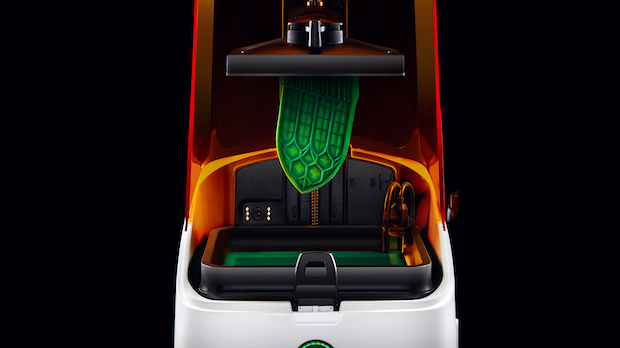
Image by 3DPrintingindustry and Uniz: The Uniz Slash resin 3D-printer
Uniz Slash resin 3D-printer specifications.
The Uniz Slash C is a professional limited-time edition LCD 3D printer. Combining a pretty decent build volume of 192 x 120 x 200 mm (7.5 x 5 x 8 in), astonishingly smooth surface finish of every printed model at just 10 microns, the ability to print at up to 150 mm/h in Natural Peel Model, and a powerful 8.9″ 4K high-definition monochrome LCD screen.
Contact us if you have any questions or when you need help with settings for the Uniz Slash or other resin based 3D-printers.


