The Phrozen Sonic Mega 8K V2 is an mSLA resin 3D‑printer engineered for large‑format production workflows that require predictable curing behavior, stable mechanical operation and consistent exposure performance across wide surfaces. It retains the 330 × 185 × 300 mm build volume and 43 µm pixel resolution of the original Mega 8K, but introduces a refined optical engine, improved light uniformity and updated firmware that enhances layer‑to‑layer consistency during high‑speed printing. Additional workflow features such as pulp & fill, fast printing mode, a plug‑in air purifier and an integrated resin drip hanger further streamline handling during large‑batch production.
This page provides validated Liqcreate resin settings, exposure parameters and calibration guidance specifically optimized for the Phrozen Sonic Mega 8K V2 hardware platform. Users transitioning between platforms can reference the Phrozen Sonic Mega 8K settings or the Phrozen Sonic Mega 8K S settings when comparing curing behavior across the Mega‑series. All verified exposure profiles are consolidated in the resin 3D‑printing parameter database, which is continuously updated with new calibration results.
For streamlined setup, a downloadable Chitubox file is available for importing the Mega 8K V2 parameters directly into the slicer. Users working with smaller‑format systems can also reference the Phrozen Sonic Mini 8K settings for cross‑platform calibration strategies. For printer‑specific questions, exposure tuning or workflow support, please reach out through the Contact page.
Liqcreate Resin Parameters for the Phrozen Sonic Mega 8K V2
The Phrozen Sonic Mega 8K V2 is designed for stable, large‑format resin printing where predictable curing behavior and consistent exposure performance are essential. When combined with Liqcreate engineering, dental and general‑purpose materials, the Mega 8K V2 can produce functional parts with high dimensional accuracy and reliable adhesion across tall builds up to 40 cm. These validated parameters provide a solid starting point for achieving uniform layer transitions and 43‑micron surface detail on a wide range of applications.
Liqcreate would like to thank our partner Neill’s Materials for providing access to the Phrozen Sonic Mega 8K V2 during parameter optimization.
| Resin | Layer thickness | Exposure time (seconds) | Base layer count | Base layer exposure | Lift Height | Lift speed / retract speed (mm/min) | Rest time (seconds) |
| Bio-Med Clear | 100 µm | 8,0 | 2 | 30 | 8 | 60 / 150 | 2 – 0 – 1 |
| 50 µm | 5,0 | 2 | 20 | 8 | 60 / 150 | 2 – 0 – 1 | |
| Deep Blue | 100 µm | 8,0 | 2 | 45 | 8 | 90 / 150 | 2 – 0 – 1 |
| 50 µm | 6,0 | 2 | 40 | 8 | 90 / 150 | 2 – 0 – 1 | |
| Stone Coal Black | 100 µm | 8,5 | 2 | 50 | 8 | 90 / 150 | 2 – 0 – 1 |
| 50 µm | 7,0 | 2 | 40 | 8 | 90 / 150 | 2 – 0 – 1 | |
| Premium White | 100 µm | 4,0 | 2 | 20 | 8 | 90 / 150 | 2 – 0 – 1 |
| 50 µm | 3,0 | 2 | 15 | 8 | 90 / 150 | 2 – 0 – 1 | |
| Premium Black | 100 µm | 5,0 | 2 | 20 | 8 | 90 / 150 | 2 – 0 – 1 |
| 50 µm | 3,5 | 2 | 15 | 8 | 90 / 150 | 2 – 0 – 1 | |
| Premium Model | 100 µm | 3,5 | 2 | 30 | 8 | 60 / 150 | 2 – 0 – 1 |
| 50 µm | 2,5 | 2 | 25 | 8 | 60 / 150 | 2 – 0 – 1 | |
| Premium Tough | 100 µm | Read instructions | |||||
| 50 µm | Read instructions | ||||||
| Wax Castable | 100 µm | 6,5 | 2 | 30 | 8 | 90 / 150 | 2 – 0 – 1 |
| 50 µm | 5,0 | 2 | 25 | 8 | 90 / 150 | 2 – 0 – 1 | |
| 25 µm | 4,0 | 2 | 20 | 8 | 90 / 150 | 2 – 0 – 1 | |
| Premium Flex* | 100 µm | 5,0 | 2 | 30 | 10 | 60 / 90 | 2 – 0 – 1 |
| 50 µm | 3,0 | 2 | 25 | 10 | 60 / 90 | 2 – 0 – 1 | |
| Clear Impact | 100 µm | 10,0 | 2 | 40 | 8 | 90 / 180 | 2 – 0 – 1 |
| 50 µm | 7,0 | 2 | 30 | 8 | 90 / 180 | 2 – 0 – 1 | |
| Strong-X | 100 µm | 8,0 | 2 | 40 | 8 | 90 / 180 | 2 – 0 – 1 |
| 50 µm | 6,0 | 2 | 30 | 8 | 90 / 180 | 2 – 0 – 1 | |
| ESD | 100 µm | 8,0 | 2 | 60 | 8 | 60 / 120 | 2 – 0 – 1 |
| 50 µm | 6,0 | 2 | 50 | 8 | 60 / 120 | 2 – 0 – 1 | |
| Flexible-X* | 100 µm | 12,0 | 2 | 50 | 10 | 60 / 90 | 2 – 0 – 1 |
| 50 µm | 10,0 | 2 | 40 | 10 | 60 / 90 | 2 – 0 – 1 | |
| Elastomer-X* | 100 µm | 18,0 | 2 | 50 | 10 | 60 / 90 | 2 – 0 – 1 |
| 50 µm | 12,0 | 2 | 40 | 10 | 60 / 90 | 2 – 0 – 1 | |
| Tough-X* | 100 µm | 14,0 | 2 | 50 | 10 | 60 / 90 | 2 – 0 – 1 |
| 50 µm | 12,0 | 2 | 40 | 10 | 60 / 90 | 2 – 0 – 1 | |
| Rigid Pro | 100 µm | 3,0 | 2 | 15 | 8 | 120 / 180 | 2 – 0 – 1 |
| 50 µm | 2,0 | 2 | 12 | 8 | 120 / 180 | 2 – 0 – 1 | |
| Hazard Glow | 100 µm | 8,5 | 2 | 40 | 8 | 120 / 180 | 2 – 0 – 1 |
| Composite-X | 100 µm | 7,0 | 2 | 40 | 8 | 90 / 150 | 2 – 0 – 1 |
| 50 µm | 6,0 | 2 | 30 | 8 | 90 / 150 | 2 – 0 – 1 | |
| Flame Retardant HDT | 100 µm | 7,0 | 2 | 30 | 8 | 90 / 150 | 2 – 0 – 1 |
| 50 µm | 5,0 | 2 | 20 | 8 | 90 / 150 | 2 – 0 – 1 | |
| Dental Model Pro Beige | 100 µm | 5,5 | 1 | 20 | 8 | 60 / 150 | 2 – 0 – 1 |
| 50 µm | 4,5 | 1 | 15 | 8 | 60 / 150 | 2 – 0 – 1 | |
| Dental Model Pro Grey | 100 µm | 4,5 | 1 | 20 | 8 | 60 / 150 | 2 – 0 – 1 |
| 50 µm | 3,5 | 1 | 15 | 8 | 60 / 150 | 2 – 0 – 1 | |
| Gingiva Mask* | 100 µm | 10,0 | 2 | 40 | 10 | 60 / 90 | 2 – 0 – 1 |
| 50 µm | 7,0 | 2 | 40 | 10 | 60 / 90 | 2 – 0 – 1 |
When printed on supports, use Cross grid type raft support structure. These stick better to the build plate. This way it is possible to print with lower bottom layer exposure time, giving less debris in the resin tank when removing the part!
* Flexible and soft resins require at least heavy supports. It is not possible to 3D-print very thin and large objects with flexible resins. Next to that, printing the full buildplate in Z-direction is not possible due to the stretching of the material during printing.
**all profiles used 20 transition layers, except otherwise noted.
Find Phrozen Sonic compatible resin
About the Phrozen Sonic Mega 8K V2 Resin 3D‑Printer
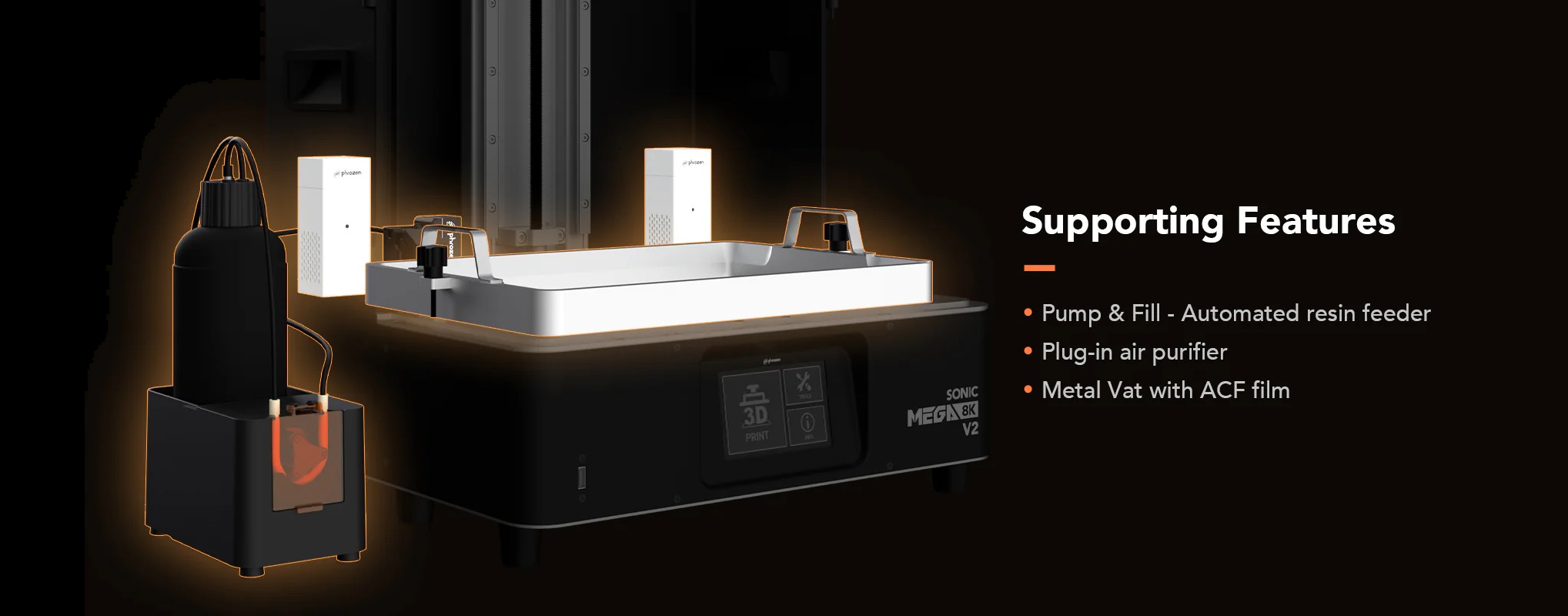
Image by Phrozen 3D: The new Phrozen Sonic Mega 8K V2 resin 3D-printer.
Phrozen Sonic Mega 8K V2 Technical Specifications and Features
| Sonic Mega 8K S | Sonic Mega 8K | Sonic Mega 8K V2 | |
| Slicer software | CHITUBOX | CHITUBOX | CHITUBOX |
| Connectivity | USB | USB | USB |
| Light technology | LCD | LCD | LCD |
| XY resolution | 43 µm | 43 µm | 43 µm |
| Layer height | 0.01-0.30mm | 0.01-0.30mm | 0.01-0.30mm |
| Max print speed | 400 layers/hour | 70mm/hr | 400 layers/hour |
| Power requirement | AC100-240V; 50-60Hz | AC100-240V; 50-60Hz | AC100-240V; 50-60Hz |
| Weight | 26kg | 35kg | 42 kg |
| Build volume | 330x185x300mm | 330x185x400mm | 330x185x400 |
Phrozen Mega‑Series Printer Cluster
For users working across multiple Phrozen systems, related resin parameters are also available for the Phrozen Sonic Mega 8K, the Phrozen Sonic Mega 8K V2 and the Phrozen Sonic Mega 8K S. These pages provide detailed exposure profiles, motion characteristics and calibration notes for each printer, enabling comparison of curing behavior across the Mega‑series and supporting consistent results when switching between platforms.
Support
If you need assistance with resin settings, calibration or print optimization for the Phrozen Sonic Mega 8K V2 or other resin‑based 3D‑printers, please contact us.
Frequently Asked Questions for the Phrozen Sonic Mega 8K V2
Question: My prints are not sticking to the build plate. What should I do Answer: Increase the Base layer exposure by +20 seconds and re‑try. If adhesion issues continue, re‑calibrate the build plate and test again with an additional +20 seconds. Still no improvement: contact our technical team at info@liqcreate.com.
Question: My prints fail halfway through the job. How can I fix this Answer:
- If failures occur between the base layers and the supports or part: increase Transition layers by +20.
- If failures occur at support tips: increase Support tip thickness by +0.1 mm.
- If failures occur mid‑part or mid‑supports: increase exposure time by +1 second.
- If failures occur at the build plate: follow the adhesion steps above. For persistent issues, contact info@liqcreate.com.
Question: How do I import print parameters into Chitubox Answer: Select the Phrozen Sonic Mega 8K V2 in Chitubox, choose Import, and load the provided settings file. All Liqcreate resin parameters will be applied automatically.
Question: How do I use Liqcreate resin settings in Lychee slicer Answer: Lychee profiles are not available. Manually enter the values from the table on this page into Lychee and save the profile. For questions or verification, contact info@liqcreate.com.
Support
Do you need any help with 3D printing our SLA, DLP or LCD resins? We can help you! Just look for the question you have below. If you can’t find it, let us know by contacting us!


